Creating a Resource Aware Pool
This recipe describes how to create and use an Umpire ResourceAwarePool. This pool is somewhat advanced
so we also provide a bit of background on Camp resources which are used to track resources and events.
Camp Resources
Umpire uses Camp resources to keep track of “streams of execution”. A single “stream of execution” on the device corresponds to a single Camp device resource (e.g. a single cuda stream). Similarly, when we are executing on the host, this corresponds to a separate “stream of execution” and therefore a separate Camp host resource.
Typically, we deal with multiple Camp resources. This includes a single resource for the host and
one or more for the device, depending on how many (cuda, hip, etc.) streams we have in use.
While we can have multiple camp resources for the device (e.g. multiple cuda streams),
we can only have one resource for the host because the host only has one stream of execution.
Since we are dealing with Camp resources, we call this pool strategy the ResourceAwarePool.
Generic vs. Specific Camp Resources
Camp has two different types of Resources: generic and specific. A specific resource is created with:
This will create a Cuda (specific) resource. With c1 we can call different methods like get_platform()
or get_stream(). Parts of Umpire such as the Operations use these camp methods under the hood. On the
other hand, a generic resource is created with:
This way of creating a generic resource uses the specific resource created above, c1, to constuct it.
We can also create a generic resource with:
The ResourceAwarePool stores a generic camp resource, but since the compiler can implicitly convert a
specific resource to a generic resource and vice versa, you can use either kind of resource
with the ResourceAwarePool methods. The catch is that only the specific resource (c1) has a
method like get_stream() which would be needed when launching kernels - so we will be using the
specific resource in the examples below.
Throughout the rest of this documentation page, we will use a “camp resource” to refer to a “stream of execution”. If the camp resource is on the device, then we are referring to a device stream such as a cuda stream or hip stream.
Using a Single Resource
Umpire’s strategies such as QuickPool and DynamicPoolList work very well
on the device when we are dealing with a single camp device resource. In the figure below, we have
the host resource which allocates memory (a1), uses the memory in a kernel (k1), then schedules
a deallocate (d2). Then, the host immidiately reuses that memory for a different kernel (k2).
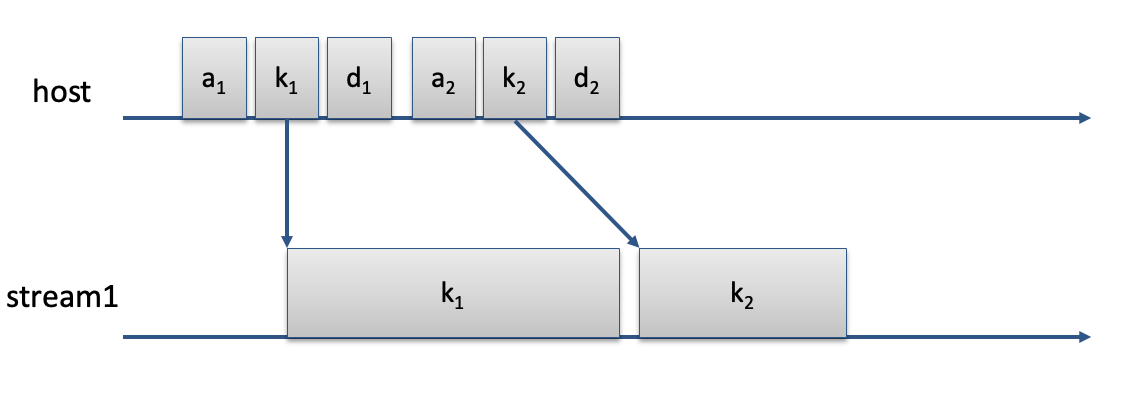
In this scenario, there is no potential for a data race, since we are dealing with just one cuda stream
and kernels on a single stream execute sequentially. In other words, this scenario deals with only
one Camp device resource. In this type of scenario, there is no need for a ResourceAwarePool because
it would behave the same as your typical QuickPool.
Note
A ResourceAwarePool with only one resource will behave the same as a QuickPool strategy.
We don’t advise using the ResourceAwarePool with only one resource since it will have the added
overhead of the pending state (explained below). Instead, just use QuickPool if possible.
Using Multiple Resources
When dealing with multiple camp device resources, there is a possibility for a data race if we allocate, use, and schedule a deallocation on one stream and then try to reuse that memory immediately on another stream. The figure below depicts that scenario. Note that the overlap in the kernels corresponds to a potential data race.
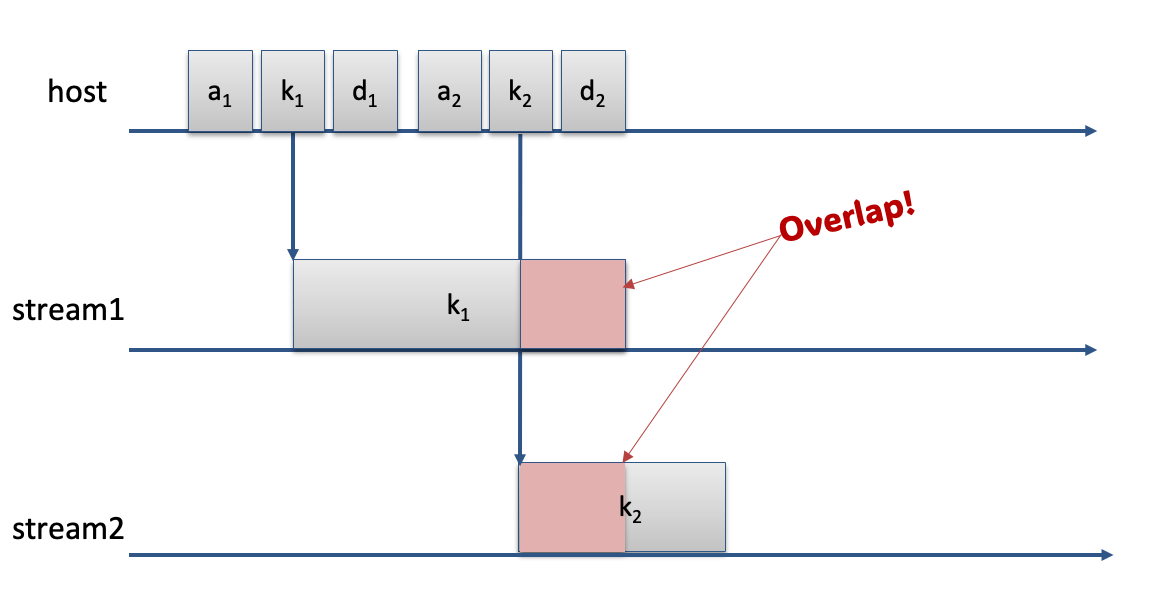
Umpire’s ResourceAwarePool is designed to avoid any potential data races by making the resources
“aware” of the memory used by another resource. If resource r2 needs to allocate memory, but that
memory is potentially still being used by another resource, r1, then r2 will use different
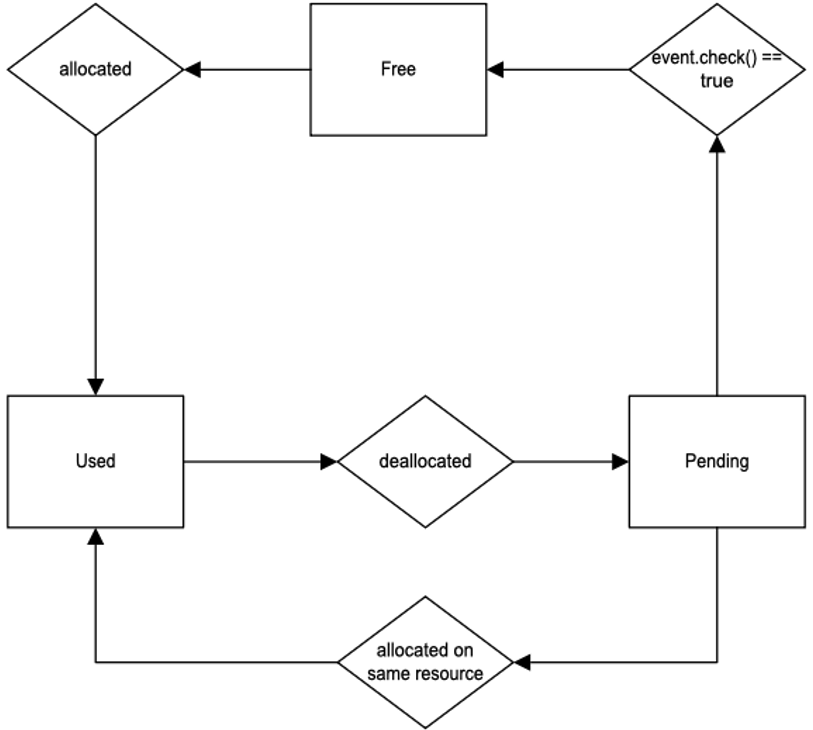
memory instead. To do that, the ResourceAwarePool introduces a “pending” state.
As soon as r1 schedules a deallocation, that memory is marked as _``pending``_ and is only available
for use by r1. When the deallocation is complete, the _``pending``_ marker is cleared, making that memory
available for use by other resources. So when r2 needs an allocation, it first checks to see if the memory
is still _``pending``_. If it is NOT _``pending``_, it will reuse that memory, otherwise it will use a
different piece of memory instead.
The figure below illustrates the 3 states of a ResourceAwarePool: free, used, and pending.
Using a ResourceAwarePool
In this example, we will review how to use the umpire::strategy::ResourceAwarePool
strategy. You can create a ResourceAwarePool with the following code:
auto& rm = umpire::ResourceManager::getInstance();
auto pool = rm.makeAllocator<umpire::strategy::ResourceAwarePool>("rap-pool", rm.getAllocator("UM"));
Next, you will want to create camp resources. We use these camp resources to track events on the resource. Below is an example of creating a camp resource for two device streams and the host.
using namespace camp::resources;
...
Cuda d1, d2; //create (specific) Cuda resources, d1 for stream1, d2 for stream2
Host h1; //create a (specific) Host resource
Then, to allocate memory with your ResourceAwarePool you can do the following:
double* a = static_cast<double*>(pool.allocate(NUM_THREADS * sizeof(double), d1));
Note that there is an extra parameter when using the allocate function. The second parameter is
the resource (d1) we want the allocated memory to be associated with. In other words, d1 is
the device stream we want to launch the kernel on which will use that memory.
Note
If allocate is called with no resource, then it will use the default Camp Host resource.
Next, be sure to launch the kernel using the correct stream.
Since we are using Camp resources, we use d1 that we created above. For example:
my_kernel<<NUM_BLOCKS, BLOCK_SIZE, 0, d1.get_stream()>>>(a, NUM_THREADS);
The kernel launch specifies the stream from the Cuda resource we created above. To deallocate, use the following code:
pool.deallocate(a, d1);
Note
It can be hard to keep track of which resource corresponds to which pointer. If it is not feasible to keep track
of that, you can call pool.deallocate(ptr) as usual. However, this method will call the private getResource(ptr)
method on the ResourceAwarePool instance and then call the deallocate method with the correct resource.
Because of this overhead, it is recommended to include a resource with the deallocate method if possible.
Assuming you need to reallocate memory on a with d2, you could then launch a second kernel with the second stream. For example:
a = static_cast<double*>(pool.allocate(NUM_THREADS * sizeof(double), d2));
...
my_other_kernel<<NUM_BLOCKS, BLOCK_SIZE, 0, d2.get_stream()>>>(a, NUM_THREADS);
Since we are using the ResourceAwarePool, we will not cause a data race from trying to reuse that memory. If the
memory is still being used by d1 by the time d2 is requesting it, it will be in a _``pending``_ state and thus
not resued by d2. Instead, d2 will be given a different piece of memory.
The ResourceAwarePool will also be useful for avoiding data races in a situation where host and device
share a single memory space. In the case of a single memory space, just having two or more camp resources,
whether host or device, will give us the potential for data races since memory can be visible by both host and device.
A full example of using the ResourceAwarePool can be seen below: